
Use case
Stop advertising products that are about to run out
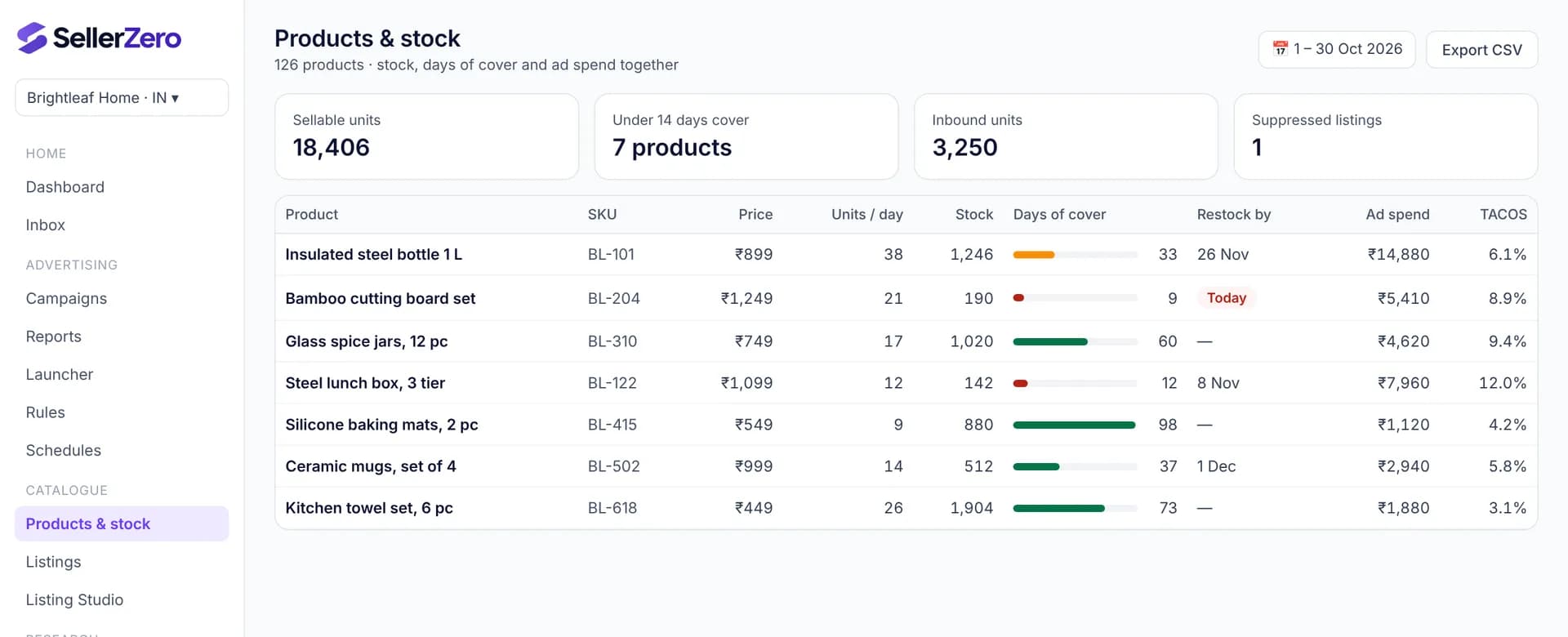
Days of cover is sellable stock divided by average daily units sold. SellerZero shows it for every product next to ad spend, raises an alert when cover drops under 14 days, and can pause ads automatically when a product is out of stock, resuming them when stock returns.
Last updated 6 November 2026
The problem
Ads keep spending on products that are about to stock out, then rank and conversion fall when stock hits zero.
Stock lives in one report and ad spend in another, so the link is easy to miss until it's too late.
How to do it with SellerZero
- 1
See cover beside spend
Products & stock lists stock, units per day, days of cover, restock-by date, ad spend and TACOS in one row.
- 2
Get alerts early
Products under 14 days of cover appear in the Inbox with their ad spend.
- 3
Slow spend on low stock
Lower budgets on products with little cover so stock lasts until the next shipment.
- 4
Pause at zero
The Out-of-stock pause rule stops ads on products with no stock and resumes them when stock returns.
What to measure
| Metric | Why it matters |
|---|---|
| Days of cover | Sellable stock ÷ average units per day (last 30 days) |
| Restock-by date | Last day to ship so stock arrives before you run out |
| Ad spend on low-stock products | Money at risk of being wasted |
Definitions: Amazon advertising glossary
Features used
Frequently asked questions
- How is days of cover calculated?
- Sellable stock divided by the average units sold per day over the last 30 days. 190 units selling 21 a day gives 9 days of cover.
- Does pausing ads hurt ranking?
- Running out of stock hurts ranking more. Pausing ads while out of stock avoids paying for clicks you can't convert; ads resume when stock returns.
Other use cases
Free while we're in beta
Every feature, every store, no card needed. Connect your seller and ads accounts in a few minutes.